
Healthcare
Demand Analysis
We witness worldwide utilization of computing technology in diverse fields of the society, especially in medicine. The rise of information technology in the medical industry has alleviated medical field with sharing and usage of patient information for diagnosis and treatment, data storage and retrieval for decision-making and other purposes. People invest continuously in medicine, as the information technology in medicine is the only key that revolutionizes hospital infrastructure and healthcare in and out, all around. Utilization of traditional computers help to some extent, but block this ongoing reformation and affect the efficiency of diagnosis and treatment. Traditional PCs features high purchase expenses, difficult to deploy and maintain, long time to recover in case of malware attack or repairs. Despite the use of varied information build-up products in the traditional system, they appear to be problematic. Let us discuss few deployment problems below.
[space] [/space] [one_half valign=”top” animation=”none”]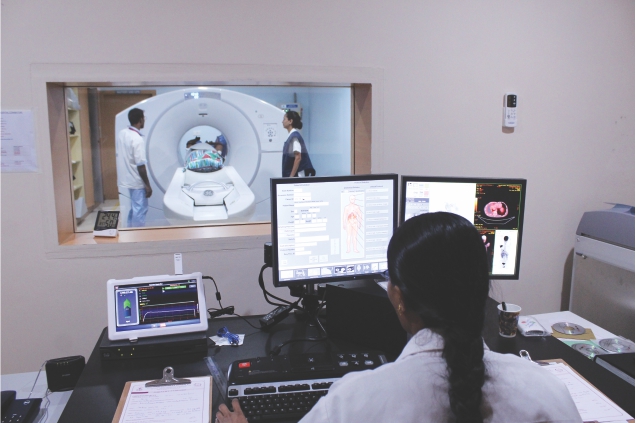
High Procurement Costs: The expenses to buy traditional PCs with a batch of servers, their related hardware and software are high. Hospitals require special larger equipment rooms to accommodate the purchased systems, which is not feasible for hospitals short of space.
Long Deployment Duration: Hospitals require many traditional PCs that need to be assembled, installed with applications and software, which may take more days and even months to finish and seem complex in nature.
Long-term Maintenance Investment: Hospitals need more IT staff to manage the increasing PC terminals, which is very hard and time-consuming. The machines become old and prone to hardware failures and software corruptions because of the numerous applications running continuously. The systems slow down or crash and the IT staff need to go, wherever it is located, on time to fix, which is exhausting and the recovery time is also slow.
Poor Security: Hospitals have many computers running various applications creating complexity. U disk is difficult to control and maintain. It is highly expected to lose medical information such as patient data, diagnosis details, treatment information, financial bills, etc. or data theft or information leak.
[/one_half_last] [/section] [section background_repeat=”repeat” background_position=”center top” background_attachment=”static” background_scroll=”none”]Solution
[space] [/space] [one_half valign=”top” animation=”none”]vCloudPoint zero clients, combined with vMatrix Server Manager software, provides an innovative way of desktop computing by powering multiple users with just one host computer. The vCloudPoint zero client devices have no moving parts, no hardware for processing or storage. All processing and storage are done on the host computer. Hence, there is no need to install local drivers, managing patches and no software licensing fees and updates for the zero clients as they serve only as input and output devices. The vMatrix Server Manager software, running on the host PC, enhances the overall functionality and usability of the sharing system by offering connection brokering, graphics acceleration, audio & USB redirection, centralized management. IT Administrators can configure, monitor and manage the endpoint devices and users centrally and simply at the server side through the front-end console. vCloudPoint zero clients, combined with vMatrix Server Manager software, provide a computing experience that is practically indistinguishable from running on a PC and offer great advantages over traditional PCs, such as saved costs, enhanced security, reduced maintenance, and simplified deployment and management.
[/one_half] [one_half_last valign=”top” animation=”none”]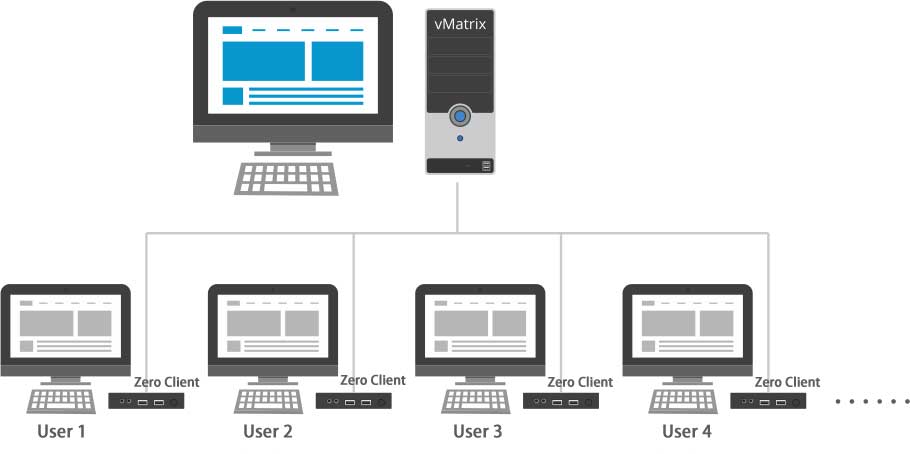
Benefits
[space] [/space] [one_half valign=”top” animation=”none”] [list id=”g1-list-1″ type=”icon” style=”simple” icon=”chevron-right”]- vCloudPoint zero client minimizes the purchase costs of PCs by 50%. Its power consumption is only 5W by average and only 1KW consumption for a month.
- vCloudPoint zero client has no breakable parts. All repairs and maintenance including installations, configurations, patching, and upgrades are minimized to the single host. Meanwhile,
users cannot modify system files or installing applications, which reduces risks of virus infection or system crack. - vCloudPoint’s proprietary desktop protocol enables excellent desktop performance for the zero client users. The experience will be in consistence with the host even running years.
- The vCloudPoint zero client has a lifespan of up to ten years and when one is damaged, it can be replaced with fresh ones to immediately get a workstation back for work. IT staff can simply upgrade the host to get all terminal workstations up to date.
- IT staff can be authorized to view all the terminal desktops live and give help if needed. If the end user faces some issues, IT staff can solve and support from the host through remote control. It reduces the time taken for solving problems and the trouble to come to the work area.
- Since the user data is centrally stored on the shared host, data loss or leak is negative. Even if the terminal is missing, data remains secure. IT staff can monitor the users and prevent the usage of USB and other storage devices and copying of important data to their removable disks.
- Setting up a new workstation is fast and easy. Fix a seat, install the software, create a user account, connect the device and the desktop is ready to access. Changing faulty terminal equipment with new one is fast too. In this case, the user desktop and data remain safe within the host.
- User desktops and access of data do not bound to terminal devices. They are centralized with individual user accounts on the host. So health care providers can access the patient’s information from anywhere and anytime.
- The size of the zero client is small, like a mobile phone and secured behind the display to get space. Fan is absent, preventing noise while at work, consume low power, and produce less heat and emissions, unlike PCs.
Components:
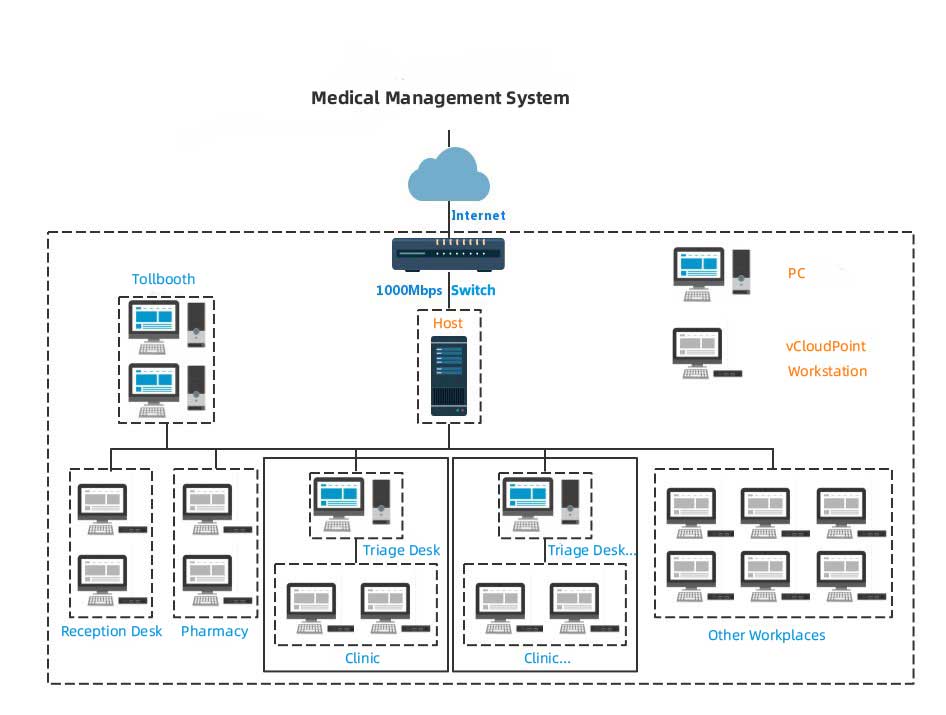
Medical system + vCloudPoint system.
The vCloudPoint system includes:
- Shared host: the computing and storage machine that delivers virtual desktops to end users.
- Zero client devices: the devices for connecting end users to the virtual desktops on the host.
- vMatrix Server Manager: running on the host to enhances the overall functionality and usability of the sharing system by offering connection brokering, graphics acceleration, audio & USB redirection, and centralized management.
Depending on the real implementations, customers may need to purchase additional network devices, keyboard & mouse and monitor for each workstation, and other necessary hardware or software in use with the computing system.
[/one_half] [one_half_last valign=”top” animation=”none”]Implementation Steps:
The vCloudPoint system can be set up at pharmacies, reception centers, workplaces like clinics and administrative offices where regular office applications take place. These workplaces need centralized administration of records and patient data, which shared computing can provide. These premises have unified desktops and run common applications useful for their scenario. There will be minimized heavy graphical applications and work with normal multimedia content that poses no compatibility issues. Healthcare providers can easily access the data from any desktop; connect the printer or scanner depending on their needs. However, PCs are required for special USB devices like tollbooths and triage desks. One can use a Mini PC and operate a local desktop to use these USB devices.
- Connect the zero client devices to monitor, USB peripherals and then connect to the LAN switch through the network cable.
- Install the vMatrix Server Manager, the multi-user patch, USB drivers and other required applications on the host.
- Create user accounts with vMatrix Server Manager.
- Login with created user accounts and ready to work on the zero clients.
Optional
- You can do some configurations depending on your specific use case, for example, setting themes, wallpaper, desktop icons, auto-run application and USB policy for users.
- You can use third-party recovery software or Windows systems for crash recovery or data back-up.