[section background_repeat=”repeat” background_position=”center top” background_attachment=”static” background_scroll=”none”]
Demand Analysis
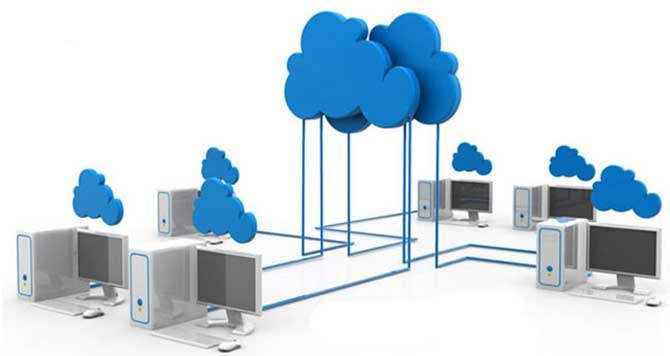
Desktop as service (DaaS) is one of the cloud computing contributions to rendering public cloud services effectively. It provides scalable, cost-effective, and highly secure cloud-based virtual desktop access anytime, anywhere. Desktop as a service (DaaS) allows you to enjoy the many benefits of desktop virtualization without having to acquire, build, and manage your own infrastructure. However, public cloud providers, such as Amazon Web Services (AWS), Microsoft Azure and Google Cloud Platform, etc., only improve the experience on the cloud, the endpoint problems by using traditional x86 desktops, laptops, or thin clients as access devices are still left on-premise.
[space]
[/space]
[one_half valign=”top” animation=”none”]
[/one_half]
[one_half_last valign=”top” animation=”none”]
- The purchase of x86 client devices is so high to just reduce the intended advantage of cost-saving by using the pay-per-usage cloud service; instead it just increases the initial purchase cost by the cloud infrustructures;
- When using x86 devices as client devices, hardware like CPU, RAM and hard disk prevail, thus leading to the PC hardware maintenance;
- X86 devices requires an operating system, drivers, and endpoint management software, increasing the risks and complexity of the cloud system;
- X86 devices often require configurations before connecting to the cloud virtual desktop, causing deplays in provisioning new users and ongoing suport costs.
[/one_half_last]
[/section]
[section background_repeat=”repeat” background_position=”center top” background_attachment=”static” background_scroll=”none”]
Solution
[one_half valign=”top” animation=”none”]
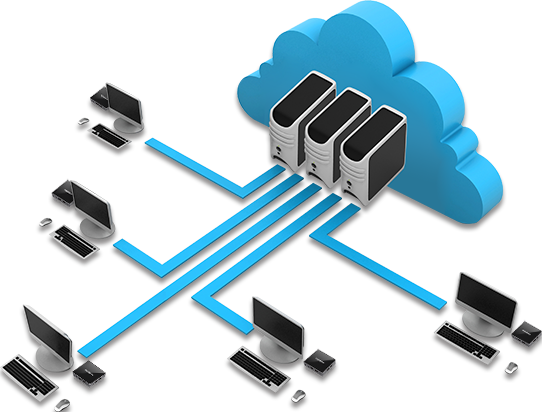
vCloudPoint extends the benefits of DaaS from the cloud to the terminal by replacing the traditional x86 thin clients or PCs with the ARM zero clients as client devices.
The vCloud Point ARM zero client has no moving parts or hardware components for processing and storage. It does not contain operating systems and software applications that run locally. Unlike traditional PCs, all processing and storage are performed on the host computer. Hence, there is no need to install local drivers, managing patches and no software licensing fees and updates for the zero clients as they serve only as input and output devices. It’s more compact, secure, reliable, maintenance-free and cost effective when compared to a traditional PC or thin client.
vCloudPoint provides high-quality desktop performance experience for virtual desktop users with the help of its own DDP protocol, guaranteeing smooth desktop operation and rich multimedia support.
vCloud Point vMatrix Server Manager software supports users to connect to the cloud virtual machines in either “1 VM: 1 user” structure for personalization and isolation concern or “1 VM: multiple users” structure to further save costs in network, host configuration and maintenance in the cloud.
[/one_half]
[one_half_last valign=”top” animation=”none”]
[/one_half_last]
[/section]
[section background_repeat=”repeat” background_position=”center top” background_attachment=”static” background_scroll=”none”]
Benefits
[space]
[/space]
[one_half valign=”top” animation=”none”]
[list type=”icon” style=”simple” icon=”chevron-right”]
- vCloud Point zero clients cost much lower than PCs or thin clients to offset the increased cost in cloud hosting. vCloudPoint Zero clients are damage-resistant and expected to have a ten years life span, reducing the replacement costs. Their average power consumption is only 5W, saving money on electricity bills.
- vCloudPoint zero clients are plug-and-play devices that required no configurations when using. You simply enter your user credential to connect to the host and you are ready to work.
- vCloudPoint zero clients have no breakable parts, no local system and software, thus they are absolutely virus-immune and maintenance-free.
[/list]
[/one_half]
[one_half_last valign=”top” animation=”none”]
[list type=”icon” style=”simple” icon=”chevron-right”]
- The virtual machines in the cloud can be owned by a single user or shared by many users. The previous connection type helps achieving exact PC experience while the later type helps cutting hosting expense for companies which have groups of users that have very similar needs in terms of applications and desktop configuration.
- The vCloudPoint Dynamic Desktop Protocol improves desktop experience for optimal performance with minimal host configuration and network bandwidth.
- vMatrix Server Management software provides comprehensive user and device management functions, helping companies realize all-rounded IT management from the cloud to the desktop.
[/list]
[/one_half_last]
[/section]
[section background_repeat=”repeat” background_position=”center top” background_attachment=”static” background_scroll=”none”]
Installation
[space]
[/space]
[space]
[/space]
[one_half valign=”top” animation=”none”]
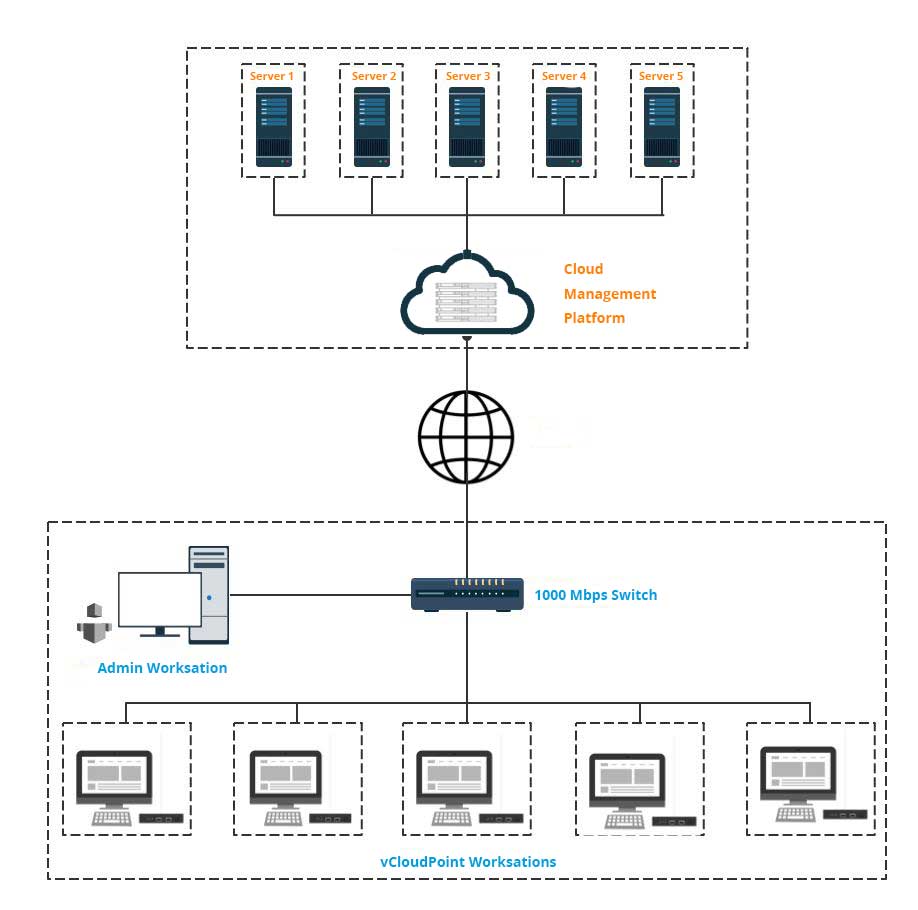
Components:
Virtual Servers: The virtual machines you purchase from a cloud service provider through a subscription model. The virtual servers are served as the computing and storage machine that delivers virtual desktops to the end users.
Cloud Management Platform: the webadmin center provided by the cloud service provider to manage your subscriptions.
Zero Client Devices: the client devices for connecting end users to the virtual desktops on the hosts.
vMatrix Server Manager Software: runs on the host with Windows installed. It provides connection brokering, graphic acceleration, audio & USB redirection andmanagement on cconnecting users & devices.
[/one_half]
[one_half_last valign=”top” animation=”none”]
Implementation Steps:
- Purchase virtual servers based on the requirements of your users.
- Install the vMatrix Server Manage and other required software applications on the virtual server.
- Create user accounts with vMatrix Server Manager.
- Connect the zero clients to monitor, USB peripherals and then connect to the LAN switch through the network cable.
- Log in with created user accounts and start to work on the zero clients.
[/one_half_last]
[/section]
[section background_repeat=”repeat” background_position=”center top” background_attachment=”static” background_scroll=”none”]
Virtual Server Configuration
[space]
[/space]
Single User Connection
[space]
[/space]
[table class=”text-center” style=”solid”]
| vCPUs |
Memory |
Storage |
Bandwidth |
| 2 |
4G |
On demand |
10M-15M |
[/table]
[space]
[/space]
[table class=”text-center” style=”solid”]
|
Server 1 |
Server 2 |
Server 3 |
| Configuration |
1vCPU 2G 1Mb |
2vCPU 4G 10Mb |
2vCPU 4G 20Mb |
| Operation |
Smooth |
Smooth |
Smooth |
| 480p Online Video |
Lagging |
Smooth |
Smooth |
| 720p Online Video |
Long buffering |
Little lagging |
Smooth |
| 480p Local Video |
Lagging |
Smooth |
Smooth |
| 720p Local Video |
Serious lagging |
Smooth |
Smooth |
| 1080p Local Video |
Serious lagging |
Little lagging |
Smooth |
| U Disk Transmission Speed |
1.5M-5M |
1.5M-5M |
1.5M-5M |
| Word Processing |
Little lagging |
Smooth |
Smooth |
| Multi-applications |
Supports 1-2 applications |
Supports 3 applications |
Supports more than 3 applications |
| Use Cases |
For single task users |
For knowledge users |
For power users |
[/table]
[space]
[/space]
50 User Connections
[space]
[/space]
[table class=”text-center” style=”solid”]
| vCPU |
Memory |
Storage |
Bandwidth |
| 24 vCPU |
128G |
On demand |
Min. 100M |
[/table]
[/section]
[section background_repeat=”repeat” background_position=”center top” background_attachment=”static” background_scroll=”none”]
Case Studies
[space]
[/space]
[recent_works template=”one_third” effect=”none” max=”3″ category_ids=”326,”]
[/recent_works]
[/section]
[section background_repeat=”repeat” background_position=”center top” background_attachment=”static” background_scroll=”none”]
Related Links
[space]
[/space]
[one_fifth valign=”top” animation=”none”]
Amazon AWS
[/one_fifth]
[one_fifth valign=”top” animation=”none”]

Microsoft Azure
[/one_fifth]
[one_fifth valign=”top” animation=”none”]
IBM Cloud
[/one_fifth]
[one_fifth valign=”top” animation=”none”]

Google Cloud
[/one_fifth]
[one_fifth_last valign=”top” animation=”none”]
Kamatera
[/one_fifth_last]
[/section]
